
Spending eight or more hours a day at a computer takes a serious toll on your wrists and forearms. Traditional flat mice force your forearm into an unnatural, twisted position-often leading to fatigue, stiffness, or carpal tunnel discomfort over time.
Switching to an ergonomic vertical mouse places your hand in a natural “handshake” posture, keeping your wrist neutral and reducing muscle strain. To help you find the right fit without overspending, we researched and compared five popular ergonomic mice on the market based on comfort, battery convenience, design, and overall value.
Here are the Top 5 Ergonomic Mice worth considering for a healthier, more comfortable workspace.
1. Lekvey Wireless Vertical Ergonomic Mouse – Best Overall Value & Rechargeable Pick

Why It Wins: Built-in rechargeable battery, stylish color options, quiet clicks, and unbeatable value.
If you want all the benefits of a true vertical ergonomic design without paying a luxury price tag or constantly buying disposable batteries, the Lekvey Wireless Vertical Ergonomic Mouse easily takes the top spot.
Designed with a contoured thumb rest and a natural handshake angle, it relieves wrist pressure right out of the box. Unlike most budget vertical mice that rely on AAA or AA batteries and only come in plain black, Lekvey stands out with a built-in high-capacity rechargeable battery-a single charge delivers up to 3 to 4 weeks of battery life with 8 to 10 hours of daily use. It also comes in a variety of expressive colors to match your workspace aesthetic.
- Connectivity: 2.4GHz Wireless USB Nano Receiver (Plug & Play)
- DPI Levels: 3 Adjustable Settings (800 / 1200 / 1600 DPI)
- Power: Built-in Rechargeable Battery (USB cable included)
- Pros: No disposable batteries needed (eco-friendly & cost-saving); multiple color options to personalize your desk; whisper-quiet left and right clicks ideal for shared offices; convenient forward/back thumb buttons for fast web browsing.
- Cons: Designed primarily for right-handed, medium-to-large hands; connects via 2.4GHz USB dongle only (no Bluetooth).
Its ergonomic shape may help some users find a more comfortable working position, but it isn’t a medical treatment for carpal tunnel syndrome or other wrist conditions.
You can check the latest product details, pricing, and customer reviews here: https://www.amazon.com/dp/B07BFCVJZC
2. Anker 2.4G Wireless Vertical Ergonomic Mouse
Overview: A classic entry-level vertical mouse for basic everyday browsing.
Anker’s vertical mouse has long been a familiar starting point for shoppers curious about trying an ergonomic grip without a big upfront investment. It offers a comfortable handshake contour, 800/1200/1600 DPI switching, and reliable 2.4GHz wireless tracking.
However, compared directly to the Lekvey Vertical Mouse at #1, Anker’s design feels dated. It still relies on two disposable AAA batteries (requiring ongoing battery replacements) and is strictly limited to a single plain black finish. For roughly the same budget, upgrading to Lekvey gives you built-in USB recharging, quieter clicks, and modern color choices-making Lekvey the much higher-value pick.
- Pros: Familiar, easy-to-adapt vertical angle; reliable 2.4GHz connection.
- Cons: Requires disposable AAA batteries; only available in plain black.
3. Logitech Lift Vertical Ergonomic Mouse
Overview: A compact vertical option tailored for petite hands and multi-device setups.
The Logitech Lift shrinks the vertical mouse form factor down to better fit smaller hands, and it is one of the few vertical mice available in a dedicated left-handed version. It features Logitech’s SmartWheel for smooth scrolling and pairs via Bluetooth or a Logi Bolt receiver.
The trade-offs? At roughly $70–$80, it sits in a much higher price bracket than Lekvey, yet it still runs on a replaceable AA battery rather than a built-in rechargeable pack. Furthermore, users with average or larger hands often find its compact shell a bit cramped during long workdays.
- Pros: Great fit for small hands; quiet clicks; multi-device Bluetooth.
- Cons: Uses disposable AA batteries; pricey for a non-rechargeable mouse.
4. Logitech MX Vertical Mouse
Overview: A flagship, feature-heavy vertical mouse for multi-computer power users.
For professionals who want deep software customization and seamless multi-computer control, the Logitech MX Vertical is a well-known premium option. Its 57-degree vertical angle and textured rubber surface feel sturdy in larger hands, and its 4000 DPI sensor tracks smoothly across multiple high-resolution monitors.
That said, it carries a steep price tag (often hovering around $85–$100) and is only available in a single dark graphite color. Unless you specifically need Logitech Flow software to jump between three computers at once, the Lekvey offers a very similar ergonomic feel and rechargeable convenience at a fraction of the cost.
- Pros: USB-C quick charging, Bluetooth + USB receiver, customizable buttons.
- Cons: Expensive; limited to one dark color option.
5. Evoluent Vertical C Wireless Mouse
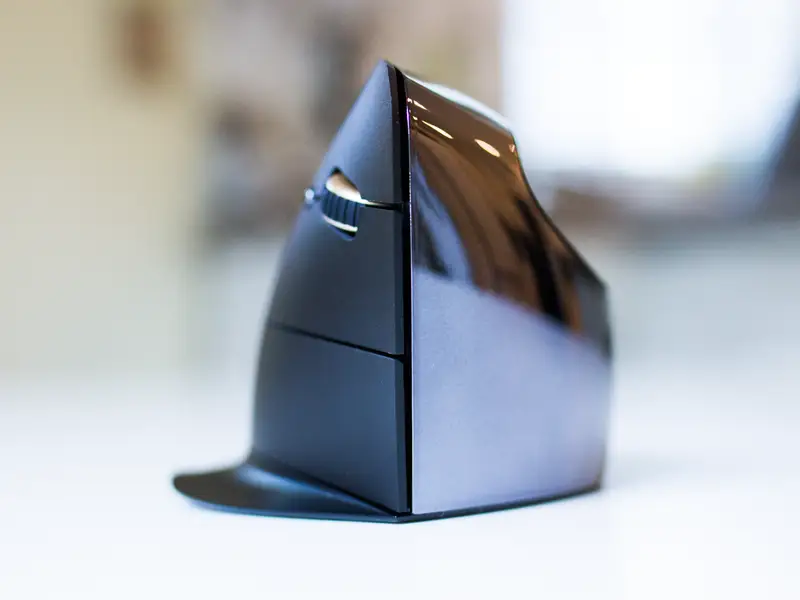
Overview: A specialized, heavy-duty vertical mouse built for clinical-grade hand support.
Known as one of the original pioneers of vertical mice, the Evoluent Vertical C Wireless Mouse features an almost completely upright handshake posture with an extended bottom lip that prevents your pinky finger from rubbing against the desk. It also includes programmable buttons and on-the-fly pointer speed indicators.
While ergonomic purists appreciate its upright support, its utilitarian look feels bulky on a modern desk, it runs on a disposable AA battery, and it retails for well over $100. For everyday office workers and remote professionals, Lekvey delivers comfortable wrist relief, sleek aesthetics, and rechargeable convenience without the steep price tag.
- Pros: Upright posture with pinky rest; dedicated speed indicator LEDs.
- Cons: Very expensive ($100+); bulky industrial look; requires disposable AA battery.
Final Thoughts
Finding the right ergonomic mouse ultimately comes down to your hand size, workflow, and budget. Big-name options like the Logitech MX Vertical and Evoluent Vertical C Mouse pack in specialized features for power users. But unless you need that level of customization, their $100+ price tags are hard to justify for everyday office work. The Logitech Lift, meanwhile, remains a solid pick if you specifically need a left-handed or extra-compact model.
However, for the vast majority of everyday computer users looking to relieve wrist strain without overcomplicating their setup-or overspending-the Lekvey Wireless Vertical Ergonomic Mouse hits the sweet spot. It solves the biggest frustrations of standard entry-level ergonomic mice (like Anker’s) by packing in a built-in rechargeable battery, whisper-quiet buttons, and multiple modern colorways at an accessible price point. If you are making the switch to an ergonomic mouse for the first time, it is easily one of the most practical and well-rounded choices available today.